
Flutter Development
Flutter Development
Flutter is Google's UI toolkit for building natively compiled applications for mobile, web, and desktop from a single codebase. It offers fast development, expressive and flexible UI, native performance, and a rich set of pre-built widgets.
| Duration | 4 Weeks | Class Hours | 1 hour/day |
| Lab Hours | 2 hours/day | Prerequisite | Basic Programming Knowledge |
| Certificate | After Successful Completion of Course | Trainer | Industry Experienced Mentor |
| Study Material | Books, Notes and Online Tests | Online Test | Unlimited |
| Project | Yes | Lectures In | English / Hinglish / Hindi |
| Fees | Please Call | Placement Support | No |
| Complimentary | Laptop Bag and T-Shirt | ||
About Flutter Development
Key Features of Flutter:
Single Codebase
Flutter enables developers to write code once and deploy it across multiple platforms, including iOS, Android, web, and desktop.
Hot Reload
Flutter's hot reload feature allows developers to quickly experiment, build UIs, add features, and fix bugs without restarting the app, resulting in faster iteration and development cycles.
Rich Widgets
Flutter provides a comprehensive set of pre-built widgets for creating beautiful and interactive UIs, including material design and Cupertino widgets.
Native Performance
Flutter apps are compiled to native code, offering high performance, smooth animations, and fluid user experiences on all supported platforms.
Expressive UI
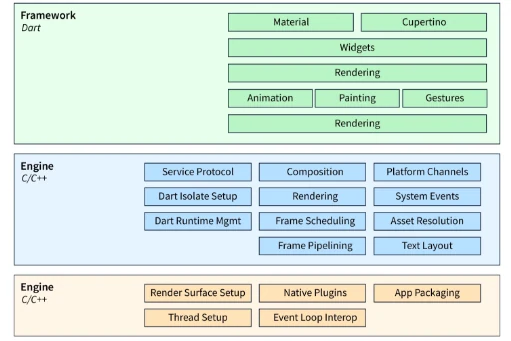
Flutter's layered architecture and flexible UI framework enable developers to create custom UI designs, animations, and transitions with ease.
Platform APIs and SDKs
Flutter provides access to platform-specific APIs and SDKs, allowing developers to integrate device features, sensors, and services into their apps.
Community and Ecosystem
Flutter has a vibrant community and ecosystem with extensive documentation, packages, plugins, and tools to support app development and solve common challenges.
Complete Flutter Development Syllabus
6 Modules · 4 Weeks
The syllabus for Flutter development covers essential concepts and techniques for building cross-platform mobile applications using the Flutter framework. Here’s an overview of the syllabus:
-
- Overview of Flutter Framework
- Setting up Flutter Environment
- Understanding Widgets and UI Components
- Creating Your First Flutter App
-
- Exploring Flutter Widget Catalog
- Working with Layouts and Container Widgets
- Building Responsive UIs with Rows and Columns
- Customizing UIs with Styling and Themes
-
- Understanding Stateful and Stateless Widgets
- Managing State with setState and Provider
- Implementing State Management Patterns
- Working with InheritedWidget and ValueNotifier
-
- Navigation Basics and Navigator Widget
- Implementing Navigation Stack and Routes
- Passing Data Between Screens
- Advanced Navigation Techniques
-
- Fetching Data from APIs
- Handling JSON and RESTful Services
- Working with Asynchronous Operations
- Implementing Caching and Offline Support
-
- Working with Device APIs and Services
- Building Custom Plugins and Packages
- Testing and Debugging Flutter Apps
- Optimizing Performance and App Size
This syllabus provides a comprehensive overview of Flutter development, equipping students with the necessary skills to build cross-platform mobile apps using the Flutter framework.
Why Should a Student or Professional Learn Flutter?
- Cross-Platform Development: Flutter allows developers to build natively compiled applications for mobile, web, and desktop from a single codebase.
- Fast Development: With Flutter's hot reload feature, developers can see changes instantly, making the development process faster and more efficient.
- High Demand: The demand for Flutter developers is growing rapidly as more companies adopt this framework for their app development.
- Community Support: Flutter has a strong and active community that provides support, plugins, and packages to extend its functionality.
- Beautiful UI: Flutter provides a rich set of customizable widgets to create visually appealing and responsive user interfaces.
- Performance: Flutter apps are compiled directly to native ARM code, which enhances their performance on mobile devices.
By learning Flutter, students and professionals can master the art of building high-performance, cross-platform applications, thereby expanding their career opportunities in the tech industry.
Interesting Facts
Flutter is an open-source UI toolkit developed by Google for building natively compiled applications for mobile, web, and desktop from a single codebase. It has gained significant traction in the developer community. Here are some interesting facts about Flutter:
1. Single Codebase for Multiple Platforms
Cross-Platform Development
Flutter allows developers to write one codebase that runs on multiple platforms, including iOS, Android, web, and desktop, reducing development time and effort.
2. Fast Development with Hot Reload
Instant Feedback
Flutter's Hot Reload feature enables developers to see changes in the code immediately without restarting the application, speeding up the development process and enhancing productivity.
3. Rich Set of Widgets
Customizable Widgets
Flutter provides a wide range of pre-designed, customizable widgets that help developers create visually appealing and highly responsive UIs with ease.
4. Dart Programming Language
Optimized for Flutter
Flutter uses Dart, a language developed by Google, which is optimized for building high-performance, modern apps. Dart’s strong typing and asynchronous programming capabilities contribute to Flutter’s efficiency.
5. High Performance with Native Compilation
Native Speed
Flutter apps are compiled to native machine code, which allows them to run with high performance and smooth animations across different platforms.
6. Strong Community Support
Active Community
Flutter has a vibrant and growing community of developers, contributors, and enthusiasts, which provides extensive support through forums, packages, and tutorials.
7. Google’s Backing
Google’s Investment
Flutter is backed by Google, which ensures ongoing development, support, and integration with other Google services and technologies.
8. Easy Integration with Firebase
Backend Services
Flutter offers seamless integration with Firebase, Google’s mobile and web application development platform, providing features like authentication, database, analytics, and cloud messaging.
9. Strong Performance on Web and Desktop
Web and Desktop Support
Flutter extends beyond mobile apps to support web and desktop applications, making it a versatile tool for building cross-platform solutions.
10. Creative UI Designs
Custom Animations
Flutter’s powerful graphics engine, Skia, allows developers to create intricate custom animations and complex UI elements, enabling unique and visually engaging app experiences.
Training Program Fee
Get Personalized Career Guidance
Our admissions team specializes in helping students choose the right career path for their goals.