
Git & Version Control Training Course
Git & Version Control Training Course
Git is a DevOps tool used for source code management. It is a free and open-source version control system used to handle small to very large projects efficiently. Git is used to tracking changes in the source code, enabling multiple developers to work together on non-linear development.It allows multiple developers to work together.It supports non-linear development through its thousands of parallel branches.
| Duration | 1 Week | Class Hours | 1 hour/day |
| Lab Hours | 1 hour/day | Prerequisite | Basic understanding of coding |
| Certificate | After successful completion of training | Trainer | Industry Experienced Mentor |
| Study Material | Books, Notes and Online Tests | Online Test | Unlimited |
| Project | Yes | Lectures In | English / Hinglish / Hindi |
| Fees | Please Call | Placement Support | No |
| Weekend Class |
1st Saturday - 6 hours (Theory +
Practical) 2nd Saturday - 6 hours (Theory + Practical) |
Complimentary | Laptop Bag and T-Shirt |
About Git & Version Control Training Course
Proficiency in Git enables candidates to manage code repositories, collaborate with team members, and track changes efficiently across projects. Git's branching model and merge capabilities facilitate parallel development and code integration, enhancing team productivity and code quality.
Moreover, Git is complemented by a rich ecosystem of tools and platforms for code review, continuous integration, and deployment automation. Its popularity in the software development community ensures extensive documentation, tutorials, and community support, making it accessible for beginners and advanced users alike.
Furthermore, Git's versatility extends beyond traditional software projects, with applications in documentation management, configuration management, and versioning of any digital content. Proficiency in Git demonstrates a candidate's ability to manage collaborative workflows, maintain code integrity, and contribute effectively to software development projects.
Following Key Topics to Cover in Git-
10 Modules · 1 Week
-
- Overview of version control systems
- Introduction to Git and its advantages
- Installing Git on different platforms
- Setting up Git configurations (username, email, etc.)
- Initializing a Git repository
-
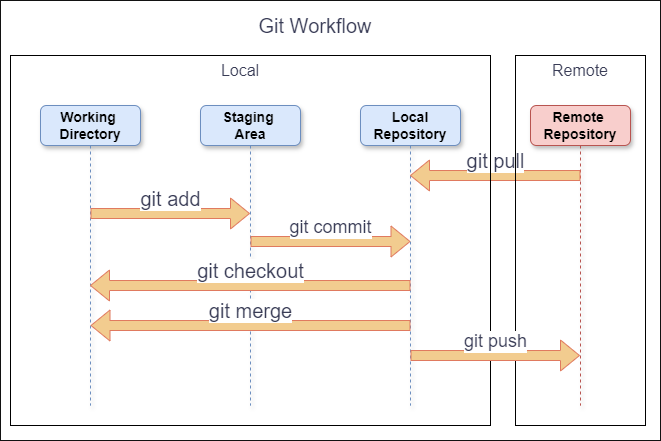
- Basic Git workflow: working directory, staging area, and repository
- Git status, add, commit, and diff commands
- Viewing commit history with git log
- Undoing changes with git reset, git checkout, and git revert
- Ignoring files using .gitignore
-
- Understanding branches in Git
- Creating and switching branches with git branch and git checkout
- Merging branches with git merge
- Resolving merge conflicts
- Best practices for branching and merging
-
- Introduction to remote repositories
- Adding remote repositories with git remote
- Cloning remote repositories with git clone
- Fetching, pulling, and pushing changes to remote repositories
- Collaborating with others using pull requests
-
- Working with tags in Git
- Using aliases to create custom Git commands
- Cherry-picking commits
- Rewriting commit history with git rebase
- Interactive rebasing and squashing commits
-
- Understanding different branching strategies (e.g., feature branching, GitFlow)
- Choosing the right branching strategy for your project
- Implementing branching strategies effectively
- Managing long-lived feature branches and hotfixes
-
- Introduction to Git hooks
- Types of Git hooks and their uses (pre-commit, post-commit, pre-push, etc.)
- Creating custom Git hooks for specific workflows
- Examples of common Git hook scripts
-
- Overview of different Git workflows (Centralized, Feature Branching, GitFlow, Forking Workflow, etc.)
- Understanding when to use each workflow
- Implementing and managing Git workflows in practice
- Best practices for successful Git workflow adoption
-
- Useful Git commands and shortcuts
- Working with Git aliases for increased productivity
- Using Git reflog to recover lost commits
- Leveraging Git bisect for debugging
- Exploring advanced Git configurations
-
- Best practices for Git usage in team projects
- Collaborative Git workflows for distributed teams
- Dealing with large repositories and performance optimization
- Integrating Git with Continuous Integration/Continuous Deployment (CI/CD) pipelines
- Case studies and examples of Git usage in real-world projects
Mastering Git is essential for efficient version control, collaboration, and project management. This curriculum covers the fundamental topics needed to become proficient in Git. By understanding these concepts, you can streamline your development workflow, enhance collaboration, and maintain a high level of code quality and consistency.
Why Should a Student or Professional Learn Git?
- Version Control: Git is a distributed version control system that tracks changes to files. It allows individuals and teams to collaborate effectively on projects by managing revisions and facilitating seamless code integration.
- Branching and Merging: Git enables efficient branching and merging workflows, which are essential for managing concurrent work on different features or versions of software.
- Collaboration: Git supports collaborative development by providing tools for code review, conflict resolution, and team coordination. It enhances transparency and productivity in software development projects.
- Flexibility and Compatibility: Git is versatile and compatible with various platforms and tools, making it suitable for diverse development environments. It integrates seamlessly with popular IDEs, CI/CD pipelines, and hosting platforms.
- Community and Resources: Git has a vast community of developers and users who contribute to its ecosystem. This community provides extensive documentation, tutorials, and plugins, ensuring continuous support and learning opportunities.
Whether you're a student exploring software development or a professional aiming to streamline your workflow, learning Git is indispensable. It empowers you to manage code efficiently, collaborate effectively, and adapt to modern development practices, thereby enhancing your productivity and career prospects.
Interesting Facts
Git is a powerful and widely-used version control system that has revolutionized software development. Here are some interesting facts about Git:
1. Created by Linus Torvalds
Origin
Git was created by Linus Torvalds, the same person who developed the Linux operating system. He started the Git project in April 2005 to manage the development of the Linux kernel after a dispute with the company behind the previous version control system, BitKeeper.
2. Distributed Version Control
Decentralized Model
Unlike centralized version control systems, Git is a distributed version control system. Every developer has a complete copy of the entire repository history on their own machine, allowing for faster access to data and better collaboration, even when offline.
3. Performance and Flexibility
Efficiency
Git is known for its performance, especially when handling large projects. Its design allows for fast branching and merging, which are essential for modern development workflows.
Experimentation
This flexibility enables developers to experiment with new features or bug fixes without affecting the main codebase.
4. Popularity and Adoption
Widespread Use
Git is the most popular version control system in use today. It is the backbone of many software development projects and platforms, including GitHub, GitLab, and Bitbucket.
Community Support
Its popularity is due to its powerful features, reliability, and strong community support.
5. Branching Model
Lightweight Branches
Git's branching model is one of its most powerful features. Branches in Git are lightweight and cheap to create, allowing developers to create, delete, and merge branches frequently.
Workflow Optimization
This model encourages workflows like GitFlow, where features, releases, and hotfixes are developed in separate branches.
6. SHA-1 Hashing
Commit Identification
Every commit in Git is identified by a unique SHA-1 hash. This ensures the integrity of the version history and makes it easy to track changes, detect corruption, and manage revisions.
Security
The use of SHA-1 hashes makes Git's version history secure and tamper-proof.
7. Staging Area
Intermediate Stage
Git introduces the concept of a staging area (or index), which allows developers to prepare and review changes before committing them to the repository.
Commit Crafting
This intermediate stage helps in crafting meaningful commit messages and grouping related changes together.
8. Open Source
Free and Open
Git is an open-source project, licensed under the GNU General Public License version 2. This means anyone can use, modify, and distribute Git freely.
Active Community
Its open-source nature has led to a large and active community that continuously improves the software.
9. Widely Used in Open Source Projects
Backbone of Open Source
Many open-source projects, including the Linux kernel, rely on Git for version control. Git's features and robustness make it an ideal choice for managing the collaborative nature of open-source development.
10. GitHub and Social Coding
Influence of GitHub
The rise of GitHub has significantly influenced the adoption of Git. GitHub provides a platform for hosting Git repositories and adds social features like pull requests, issues, and project wikis, which facilitate collaboration and community engagement in software development.
Training Program Fee
Get Personalized Career Guidance
Our admissions team specializes in helping students choose the right career path for their goals.